


Everything You Need to Know About Chevy’s Infotainment System
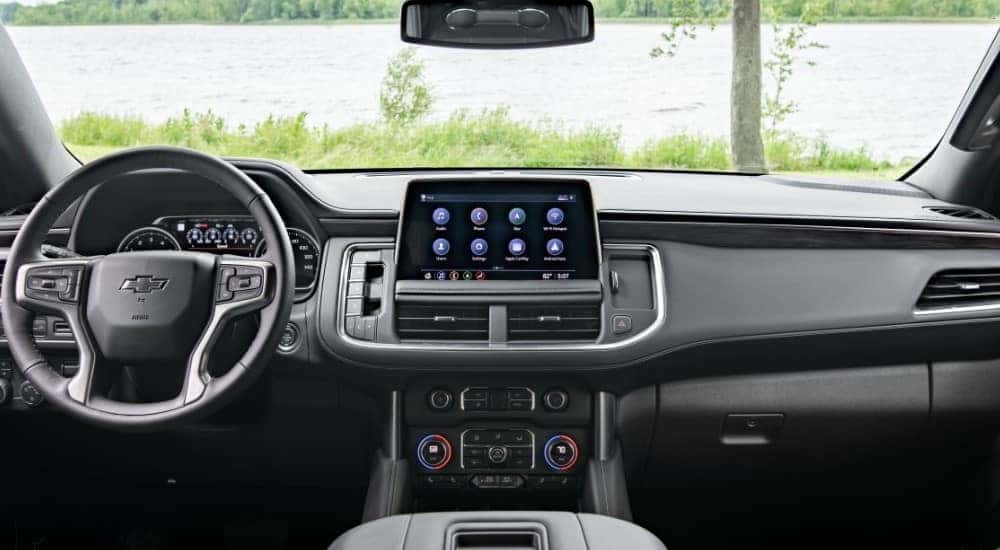
One of the coolest features of new Chevrolet models is the infotainment system. With plenty of connectivity features and entertainment options, you will never be bored in a new Chevy vehicle. As one of the top-rated Chevy dealers in Albany, NY, our experts here at DePaula Chevy are here to help you learn more about the Chevy Infotainment 3 system. In this useful guide, you will find answers to all of your questions. Let’s get started!
In-Vehicle Technology
While the size of the interface display may vary depending on which vehicle you choose, every new Chevrolet model comes with a touchscreen entertainment center. The basic Chevy Infotainment System includes Bluetooth connectivity for hands-free calling and text messaging. You can also stream music directly from your mobile device, and some vehicles allow you to sync up to two different devices. A 4G LTE Wifi hotspot is also standard, which is quite useful for accessing apps on-the-go.
Another standard feature that everyone loves is advanced smartphone integration. If you have an iPhone, Apple CarPlay is what you will use. This feature allows you to use Apple Music, iTunes, Maps, and so much more. You can even ask Siri to read any new text messages that you receive while driving.
If you use a smartphone other than an iPhone, then Android Auto will be your new best friend. Allowing you to access music, navigation, phone, and text functions while you’re driving, you will never have to take your hands off the wheel. Voice-guided navigation and live traffic updates are also included.
SiriusXM satellite radio with 360L can also be found on many new Chevy models. Offering over 200 ad-free channels, you can enjoy listening to music, news, sports broadcasts, and so much more. Also, thousands of hours of On Demand shows will be available at the push of a button.
Another handy feature that you will find useful is the In-Vehicle Apps function. This allows you to select from a wide range of applications, including Spotify, Pandora, USA Today, Fox Sports, The Weather Channel, Marketplace, and even the myChevrolet App.
myChevrolet App
Once you download the myChevrolet App, everything will be easy. You won’t believe some of the incredible features that become available with this system. Let’s start by discussing remote access.
Using the remote key fob, you can control many functions of your vehicle. These include starting or stopping the engine, locking or unlocking the doors, and even sounding the horn. This feature also includes vehicle location services, vehicle status updates, and a voice assistant. The location services allow you to set boundary alerts and share your arrivals and departures with loved ones. Vehicle status updates include fuel, odometer readings, oil life, and tire pressure.
Using the myChevrolet App, you can also stay on top of vehicle management. Easily access the owner’s manual via your smartphone. You don’t need to keep the paper copy on hand constantly. You can also manage your Wifi name and password or add services to your plan. Finally, you can schedule vehicle maintenance services right here at DePaula Chevy and even check for any current recalls.
If you own a new Chevy truck or SUV with towing abilities, then the myChevrolet App will also have some trailering features for you. The trailer light test will ensure that all of your lights are working properly. Meanwhile, the trailer load calculator will ensure that you are within the towing limit of your particular vehicle. You can drive more confidently with these features at your fingertips.
For folks who drive a Chevy EV model, you will love the EV features that come with the myChevrolet App. The Energy Assistant connects with Apple CarPlay and Android Auto to keep track of your vehicle’s remaining range and nearby charging stations. It will even tell you if your current route is within range.
Other owner resources included with the myChevrolet App are easy-to-follow how-to videos and My Rewards. Once you enroll in My Rewards, you can earn points for services, accessories, and more. Finally, the Smart Driver feature provides you with valuable insights into your driving habits. It may even help you qualify for discounts on your auto insurance.
Marketplace
As we mentioned briefly before, the Marketplace feature is something you can access via the In-Vehicle App function. It is the first-ever in-vehicle application that allows you to interact with merchants from the comfort of your own car. You can order carryout from Applebee’s and IHOP, and you can even put in a delivery order from Domino’s. With the help of Yelp, the Marketplace features also allows you to reserve a table at over 4,000 restaurants across the United States. If that’s impressive, then we have some more good news for you. You can fill up your tank, pay for your gas, and even earn rewards using the Marketplace with Exxon, Mobil, and Shell gas stations. Using ParkWhiz, you can find available parking spots around the city, and you can also book a hotel room via Priceline. Doing this will also get you a Chevy owner discount! It doesn’t get much better than that.
Additional Features
Many extra features are available via the Chevrolet Infotainment System. The first one that we will address is Alexa Built-In. This voice-controlled, fully-integrated experience allows you to connect with your in-home smart devices while you are away. Car-to-home capabilities include opening the garage door, turning the lights on or off, and even adjusting the thermostat. You can also track order, add items to your shopping list, and stream music via Alex Built-In.
If you have Chevrolet Infotainment System Plus, this interface comes with navigation. Not only does this advanced feature include real-time traffic updates, but it can also be used to save frequently visited places. You won’t have to waste time typing in your address. You can simply say, “Go Home.”
You can also download Key by Amazon to turn your vehicle into a mobile locker anywhere you go. After you set-up this feature, you can have your Amazon packages delivered to your Chevy vehicle. If you live in an urban environment, this can help prevent theft.
Finally, you can create an action on Google Assistant using the myChevrolet App. You can create actions to play music, control the lighting, or even to lock/unlock the vehicle. Once the actions are made, all you have to do to activate them is say, “Hey Google.”
Customize Your Display
With all of those features at your fingertips, it might seem a bit overwhelming at first. However, you can customize your infotainment screen with your most-used apps and functions. This can cut down on distractions. To customize the screen, follow these simple steps:
- Select the myChevrolet App on your smartphone.
- Then, select Remote Personalization.
- Next, choose Apps.
- On this present screen, you can swipe the selector to choose your favorite apps.
- Then, choose Save Changes.
- To customize audio, select Favorites, and toggle your favorite stations on.
- Next, choose Done.
Once you have completed these steps, your changes will be saved to your Chevrolet vehicle. You can check by starting your vehicle and logging into your profile. Your customized selection of apps should appear on the touchscreen interface. It doesn’t get any easier than that!
Find Your Next Vehicle at DePaula Chevy
As such an advanced interface, the Chevrolet Infotainment System is pretty easy to master. If you would like to try it out for yourself, get in touch with our experts here at DePaula Chevy. We are your one-stop-shop Chevy dealer in Albany, NY.


0 comment(s) so far on Everything You Need to Know About Chevy’s Infotainment System